skEdit: Lightweight Mac HTML editor for hand‑coding web projects
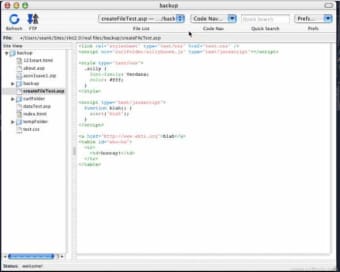
skEdit, by Sean Kelly, is a Mac text and HTML editor aimed at developers who prefer hand‑coding to WYSIWYG tools. It focuses on direct code editing, offering site management, remote file transfer, code snippets, Subversion support, and HTML Tidy integration for markup cleanup. Extensible syntax highlighting, customizable code completion, and a snippet library make core editing efficient for front‑end and light back‑end workflows. The app suits web developers and Mac enthusiasts who need a compact, code‑centric editor with built‑in remote editing.
Top Recommended Alternative

Project workflows map to mixed local and server‑backed sets
Project Manager groups local, remote, or mixed file sets so developers can treat a site as a single workspace. The app connects to servers via FTP, SFTP, and WebDAV, allowing edits to be applied directly to live files. That file‑level deployment model shortens small maintenance cycles and matches hands‑on desktop workflows rather than automated, CI‑driven pipelines, making it practical for quick fixes and incremental site updates.
Native desktop design reduces friction compared with heavy web suites
The app uses a clean, native Mac interface and positions itself as a lighter alternative to heavy suites such as Dreamweaver. Native controls and keyboard‑focused operations speed routine editing, while an internal browser preview lets developers test markup without switching tools. This environment suits developers who prefer manual markup and keyboard navigation over visual drag‑and‑drop design, supporting focused code editing during iterative development sessions.
Extensibility appeals to power users but legacy status constrains modern use
The tool exposes an extensible syntax engine so users can define language rules and customize code folding behavior; snippets support placeholders and completion for user‑defined classes. Integrated HTML Tidy and built‑in Subversion allow markup cleanup and in‑editor diffs or commits. Kelly ceased active development years ago, and the app targets older Mac OS X releases, which limits its practical fit for contemporary development environments and modern toolchains.
Best suited for maintenance on legacy Mac workflows, not modern primary development
skEdit is a pragmatic choice for developers maintaining legacy Mac workflows and archival sites, especially where older toolchains must be preserved. Its lack of recent updates and focus on older desktop releases reduce its suitability as a primary editor for contemporary web projects. Practical approach: retain it for maintenance on legacy machines or virtualized environments, and adopt a current editor for active development.